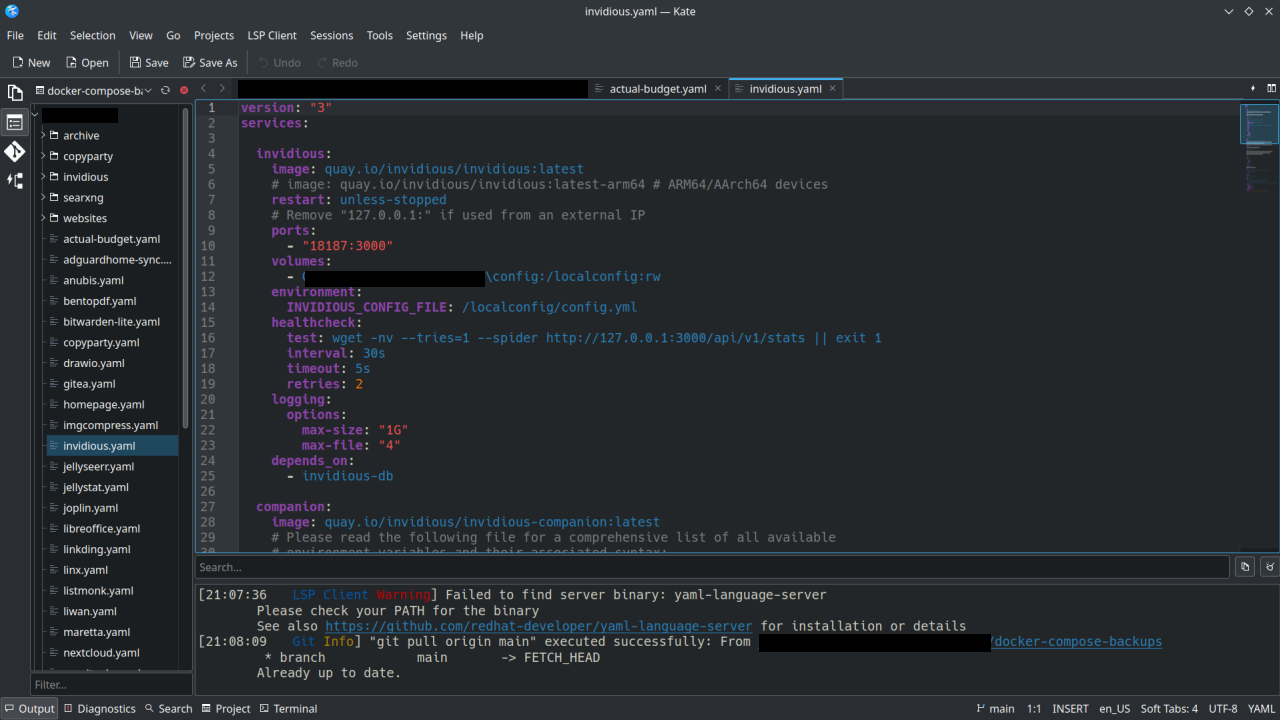
I have been using KDE via Kubuntu for about 2 years now, other distros with Gnome before that. Based upon the name (KDE Advanced Text Editor, K.A.T.E.) I always thought of Kate as an alternative to Notepad++ or something like that. Like a highend note-taking app.
I recently started using Kate for managing my Docker-Compose yaml files on my homelab, using the Git functionality to sync to my repos and doing some web development. It’s basically an alternative to VSCode or Codium.
Thanks to the devs who work on Kate . If you don’t hear it enough we appreciate you!
God I love Kate. Being able to just randomly open any file and get syntax highlighting and tabs makes dealing with system files so much easier
Yeah, Kate is excellent. I use it on my Linux stuff at home but I use it on Windows at work also.
but I use it on Windows at work also.
Huh… And here I was, never even considering that somebody may have ported Kate to Windows. I should try it, for the rare instance I’m editing something on Windows!
tons of KDE software is on the windows store, from KDE themselves, even (i can’t link the platform filter directly, just change the “all platforms” dropdown to “windows”)
God damnit. I never knew Konsole was available on windows.
I think you mean Kwindows.
KDE connect works too
Me too, it’s been such a blessing!
Kate was my first “real” code editor coming from windows notepad back in the 90’s. It was my first taste of syntax highlighting.
Fond memories.
Currently learning Python. Kate is awesome for that.
Ctrl + Shift + B is what converted me to a kate worshipper!
TIL about Block Select!
Also Alt+click to add multiple cursors.
Indeed. It lets you do so much with that little feature. Not just select but edit also. My mind was blown. Made adding prefixes to each new line a piece of cake.
I just took to using it since it was the default pre-installed editor when I went KDE.
I’ve been able to do everything I needed in it, all the way up to writing fairly complex python.
No complaints. In fact I quite like it.
I use Zed these days, but I’ll never uninstall Kate.
Zed is quite impressive, it opens like instantly when you double click it.
VS Codium on the other hand takes a few seconds to display everything correctly. Yes once its open it speeds up and is not that slow anymore, but compared to Zed it does still feel very heavy.
Kate is awesome I use it every day; if not as a scratch pad, as an editor.
KATE replaced VSCode and Codium for my open source development work.
It’s my fave too. It handles opening files over the network very well and I like the scrolling system on the right.
Featherpad is my alternative when I want something I can paste into on the screen right now as Kate loads a little slowly.
when I want something I can paste into on the screen right now as Kate loads a little slowly
Fun fact I just learned recently: If you have text in your clipboard, you can paste that directly into the file manager (or the desktop background). It will prompt you for a filename, and then create a file with the pasted text in it.
If all you want to do is paste some text, you can actually do that without using any text editor at all.
I met Kate back in 2003 or so, immediately fell in love, and still use it (no longer my primary code editor, but primary for everything else.)
Kate looks a lot like Godots editor no? Maybe its just me
I also really like it, it is fast, OS native, has polkit integration for system files, LSP and linting works too, for example shellcheck for posix sh or bash scripts.
Have not used some of the features yet
I absolutely love Kate, I’ve been using it since 2019 when I switched to Linux and I needed a replacement for Notepad++, and I prefer it to more sophisticated editors like VS Code.
One thing I miss from Notepad++ that I’ve never found in a Linux text editor is the ability to just open it and type stuff and it stays there even if you close it and open it again.
I have a tiny program/script that creates a file in a folder underneath
~/.local/sharewith basically just a timestamp in the file name and then it opens it in Kate. Certainly somewhat of a workaround, but it works quite well for me.What does the workflow look like for that? Do you run it in the terminal each time, or do you bind it to a keyboard combo or have an icon on your dock/taskbar or something?
Well, I have it bound to
Super+X, but you could do any of those. I just create a .desktop file for it and then it can be used like a normal application. And well, it is intentionally built so you don’t have to pass command-line flags or see the command output for creating the file.So, this is the program I use: https://codeberg.org/trem/jot
It has basically three larger features, which is adding a file, removing empty files (because you sometimes might end up creating a file, but not using it) and then searching through empty files.
Honestly, none of these are particularly difficult to throw together in a Bash script yourself, if you don’t feel like using a random program off the internet.Basically, for adding a file, this is a crappy version of it:
data_dir="$HOME/.local/share/notes"
mkdir -p $data_dir
date=$(date +%s)
file_name="$data_dir/${date}.md"
touch $file_name
xdg-open $file_name
And for searching through the created files,
grep -iR -C2 $data_diris virtually just as good, too. 🫠
Have you tried using the Sessions feature in Kate? It allows you to pick up where you left off, even between multiple projects.
I haven’t! But the main advantage of the Notepad++ way is the files aren’t actually saved anywhere, it saves them temporarily until you choose where to properly save them. You can just keep opening new tabs and putting stuff in them and it remembers even if closed, but you don’t have to actually save them.
Oh shit you’re right, it does do that!
For others, here’s what I did:
- Open Kate
- Click the “Sessions” menu, then “Save session”. Give it a name.
- Close Kate.
- Open Kate, it prompts for which session you want. Click to open the session you just saved, but also click “Do not ask again”.
- Open a new tab. Type something. Open another, type something else. Don’t even save, just close Kate.
- Open it again, everything is where you left it!
Sublime Text supports this, but it’s not FOSS.
For this reason, Sublime Text is to me basically a gigantic scratchpad with dozens of tabs open at all times 😂
@Dave @yodeljunkmanenvy Hmm interesting… I personally tend to think of that as a feature of a notetaking app rather than a text editor. But I see how it could come in handy in a text editor too, sometimes.
Maybe I should be looking for a note taking app, but I want it for storing everything from to do list items to quick edits of code snippets so I kind of want the text editor features.
Hmm, I guess I have Joplin and I use it a lot, but it doesn’t really feel the same as a text editor. I’m not really sure how to explain it haha
@Dave @bitterseeds FWIW I use Obsidian for notes but I feel like the way it handles code snippets is one of its weaknesses. Joplin seems marginally better 🤷 but I have not found a proper “code notes” app that I’m happy with.
@Dave Oh. I get you. I’ve jacked up VIM into a full on IDE, I do 98% of my day in VIM. Obsidian is good for a lot of stuff, I keep longer term code snippets and notes in it. I usually have two windows on my main VTE … VIM and Obsidian. :D
I get ya though. I do. I’m just an old head, so VIM will have to be removed my cold, dead hands. 🤣
I feel like I should up my game in vim. It’s my preferred CLI text editor, I hate when things default to nano as I have trouble working out how to use it. But I very much use the OOTB vim and only basic commands at that.
When you say you have it set up as an IDE, are you talking something that looks like the first picture here (with the red boxes)? I have so much to learn 😅
Windows does this now /s